The if statement allows a program to carry out different actions depending on the nature of the data to be processed.
This elevator panel “skips” the
thirteenth floor. The floor is not
actually missing—the computer
that controls the elevator adjusts
the floor numbers above 13.
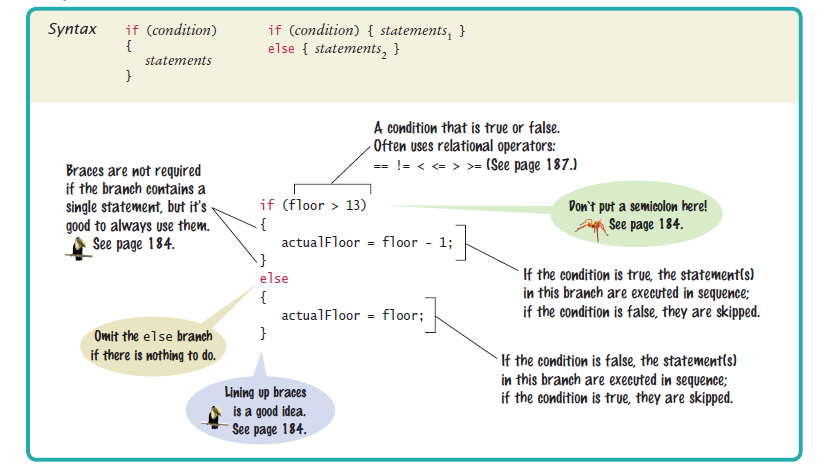
int actualFloor;
if (floor > 13)
{
actualFloor = floor - 1;
}
else
{
actualFloor = floor;
}
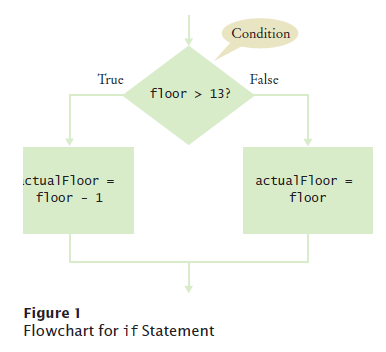
The if Statement
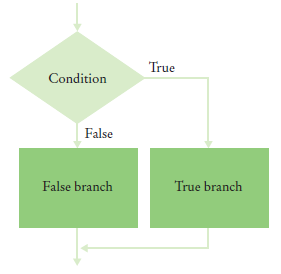
Flowchart with two branch
You can include as many statements in each branch as you like.
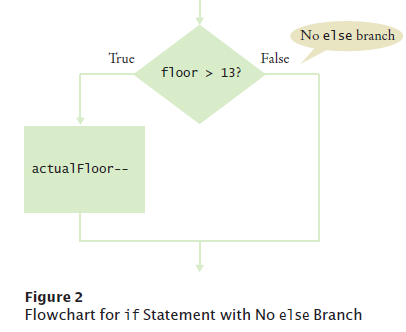
The if Statement
Flowchart with one branches
When there is nothing to do in the else branch, omit it entirely
int actualFloor = floor;
if (floor > 13)
{
actualFloor--;
} // No else needed
The if Statement
An if statement is like a fork in
the road. Depending upon a
decision, different parts of the
program are executed.
What is the discounted price if the original price is 95? 100? 105?
Answer:
95. 100. 95.
Self Check 5.5
The variables fuelAmount and fuelCapacity hold the actual amount of fuel and the
size of the fuel tank of a vehicle. If less than 10 percent is remaining in the tank, a
status light should show a red color; otherwise it shows a green color. Simulate
this process by printing out either "red" or "green".
In Java, you use a relational operator to check
whether one value is greater than another
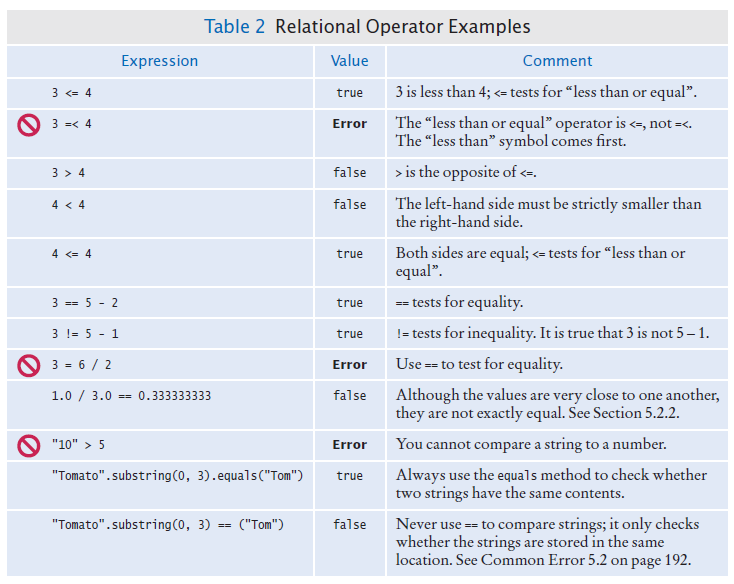
Comparing Values: Relational Operators
Relational operators compare values
Java
Math Notation
Description
>
>
Greater than
>=
≥
Greater than or equal
<
<
Less than
<=
≤
Less than or equal
==
=
Equal
!=
≠
Not equal
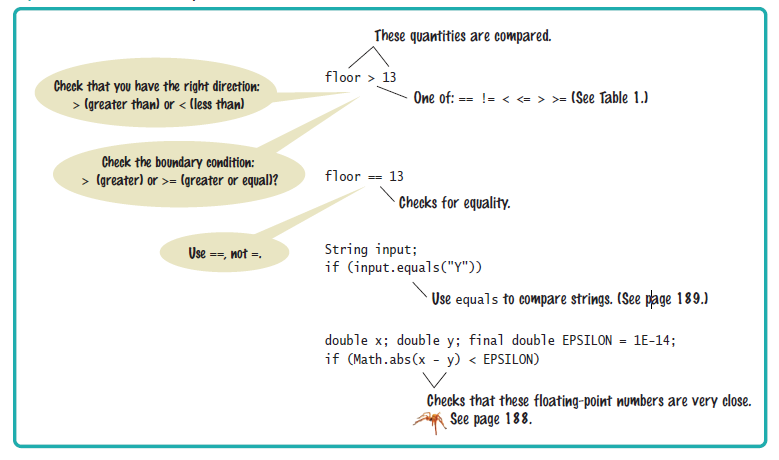
The == denotes equality testing:
floor = 13; // Assign 13 to floor
if (floor == 13) // Test whether floor equals 13
Relational operators have lower precedence than arithmetic operators:
floor - 1 < 13
Syntax 5.2 Comparisons
Comparing Floating-Point Numbers
Consider this code:
double r = Math.sqrt(2);
double d = r * r -2;
if (d == 0)
   System.out.println("sqrt(2)squared minus 2 is 0");
else
   System.out.println("sqrt(2)squared minus 2 is not 0 but " + d);
It prints: sqrt(2)squared minus 2 is not 0 but 4.440892098500626E-16
This is due to round-off errors
When comparing
floating-point
numbers, don’t test
for equality.
Check whether they
are close enough.
Comparing Floating-Point Numbers
To avoid roundoff errors, don't use == to compare floating-point
numbers
To compare floating-point numbers test whether they are close enough: |x
- y| ≤ ε
final double EPSILON = 1E-14;
if (Math.abs(x - y) <= EPSILON)
   // x is approximately equal to y
ε is commonly set to 10-14
Comparing Strings
To test whether two strings are equal to each other, use equals method:
if (string1.equals(string2)) . . .
Don't use ==to test forequal content!
if (string1 == string2) // Generally Not Useful
== tests if two strings variables reference the same memory location
equals method tests equal contents
Comparing Strings - compareTo method
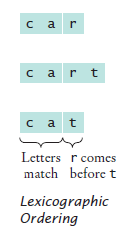
compareTo method compares strings in lexicographic order - dictionary order.
string1.compareTo(string2) < 0 means:
string1 comes before string2 in the dictionary
string1.compareTo(string2) > 0 means:
string1 comes after string2 in the dictionary
string1.compareTo(string2) == 0 means:
string1 and string2 are equal
Lexicographic
Ordering
Lexicographic Ordering
Differences in dictionary ordering and ordering in Java
All uppercase letters come before the lowercase letters. "Z" comes before "a"
The space character comes before all printable characters
Numbers come before letters
Ordering of punctuation marks varies
To see which of two terms comes first in the dictionary,
consider the first letter in which they differ
Comparing Objects
The
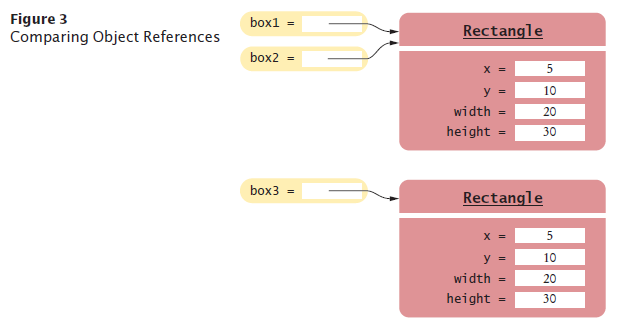
== operator tests whether two object references are identical.
whether they refer to the same object.
Look at this code
Rectangle box1 = new Rectangle(5, 10, 20, 30);
Rectangle box2 = box1;
Rectangle box3 = new Rectangle(5, 10, 20, 30);
box1 == box2 is true
box1 == box3 is false
Use the equals method to test if two rectangles have the same content
box1.equals(box3)
They have the same upper-left corner and the same width and height
Caveat: equals must be defined for the class
Object Comparison
Testing for null
null reference refers to no object:
String middleInitial = null; // Not set
if ( . . . )
   middleInitial = middleName.substring(0, 1);
Which of the following conditions are true, provided a is 3 and b is 4?
a. a + 1 <= b
b. a + 1 >= b
c. a + 1 != b
d. a = b - 1
Self Check 5.7
Give the opposite of the condition floor > 13
Answer:floor <= 13
Self Check 5.8
What is the error in this statement?
if (scoreA = scoreB)
{
   System.out.println("Tie");
}
Answer:
The values should be compared with ==, not =.
Self Check 5.9
Supply a condition in this if statement to test whether the user entered a Y:
System.out.println("Enter Y to quit.");
String input = in.next();
if (. . .)
{
   System.out.println("Goodbye.");
}
Answer:
input.equals("Y")
Self Check 5.10
Give two ways of testing that a string str is the empty string.
Answer:
str.equals("") or str.length() == 0
Self Check 5.11
What is the value of s.length() if s is
a. the empty string ""?
b. the string " " containing a space?
c. null?
Answer:
(a) 0; (b) 1; (c) an exception occurs.
Multiple Alternatives: Sequences of Comparisons
Multiple if
statements can be
combined to evaluate
complex decisions.
You use multiple if statements to implement multiple alternatives
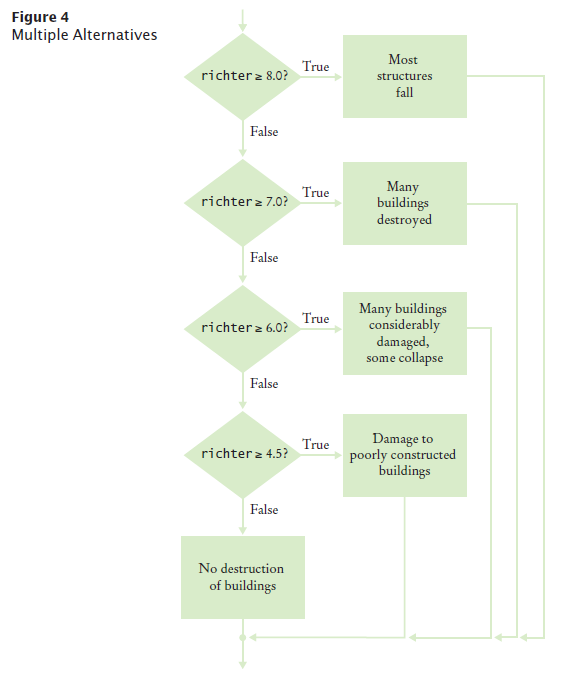
Example: damage done by earthquake of a given magnitude on the Richter scale
if (richter >= 8.0)
{
   description = "Most structures fall";
}
else if (richter >= 7.0)
{
   description = "Many buildings destroyed";
}
   else if (richter >= 6.0)
{
   description = "Many buildings considerably damaged, some collapse";
}
   else if (richter >= 4.5)
{
   description = "Damage to poorly constructed buildings";
}
else
{
   description = "No destruction of buildings";
}
As soon as one of the four tests succeeds:
The effect is displayed
No further tests
are attempted.
If none of the four cases applies
The final else clause applies
A default message is printed.
Multiple Alternatives
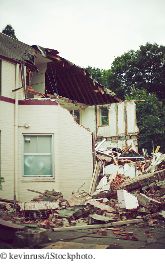
The 1989 Loma Prieta
earthquake
that
damaged the Bay
Bridge in San Francisco
and destroyed many
buildings measured 7.1
on the Richter scale.
Multiple Alternatives - Flowchart
Multiple Alternatives
The order of the if and else if matters
Error
if (richter >= 4.5) // Tests in wrong order
{
   description = "Damage to poorly constructed buildings";
}
else if (richter >= 6.0)
{
   description = "Many buildings considerably damaged, some collapse";
}
else if (richter >= 7.0)
{
   description = "Many buildings destroyed";
}
else if (richter >= 8.0)
{
   description = "Most structures fall";
}
When using multiple
if statements, test
general conditions
after more specific
conditions.
Multiple Alternatives
In this example,must use if/else if/else sequence, not just multiple independent if statements
Error
if (richter >= 8.0) // Didn't use else
{
   description = "Most structures fall";
}
if (richter >= 7.0)
{
   description = "Many buildings destroyed";
}
if (richter >= 6.0)
{
   description = "Many buildings considerably damaged, some collapse";
}
if (richter >= 4.5)
{
   "Damage to poorly constructed buildings";
}
The alternatives are no longer exclusive.
Self Check 5.13
In a game program, the scores of players A and B are stored in variables scoreA and scoreB. Assuming that the player with the larger score wins, write an if/
else if/else sequence that prints out "A won", "B won", or "Game tied".
Answer:
The if (price <= 100) can be omitted (leaving
just else), making it clear that the else branch is
the sole alternative.
Self Check 5.17
Suppose the user enters -1 into the earthquake program. What is printed?
Answer:
No destruction of buildings.
Self Check 5.18
Suppose we want to have the earthquake program check whether the user entered
a negative number. What branch would you add to the if statement,
and
where?
Answer:
Add a branch before the final else:
else if (richter < 0)
{
   System.out.println("Error: Negative input");
}
Nested Branches
Nested set of statements:
An if statement inside another
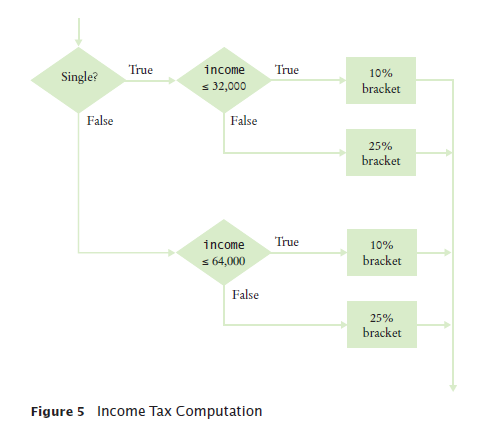
Example: Federal Income Tax
Tax depends on marital status and income
We say that the income test is nested inside the test for filing status
Two-level decision process is reflected in two levels of if statements in the program
Computing income taxes requires multiple levels of decisions.
Please enter your income: 80000
Are you married? (Y/N) Y
Tax: 10400.0
Problem Solving: Flowcharts
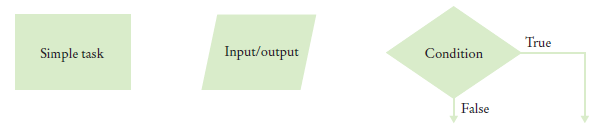
A flowchart shows the structure of decisions and tasks that are required to solve a problem.
Flow charts are made up of elements for tasks, input/output, and decisions.
Flowchart Element
Link tasks and input/output boxes in the sequence
in which they should be executed.
Problem Solving: Flowcharts
Whenever you need to make a decision, draw a
diamond with two outcomes
Flowchart with Multiple Choices
Problem Solving: Flowcharts
Each branch of a
decision can contain
tasks and further
decisions.
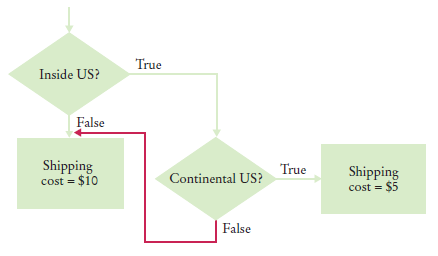
Never point an
arrow inside
another branch.
BAD - spaghetti code
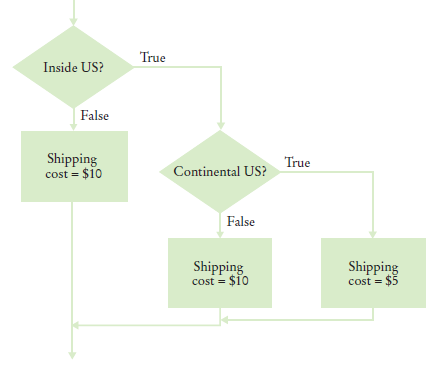
Problem Solving: Flowcharts
GOOD - better design
In the future the cost for international shipments may be different from that to Alaska and Hawaii.
Spaghetti code has so many pathways that
it becomes impossible to understand.
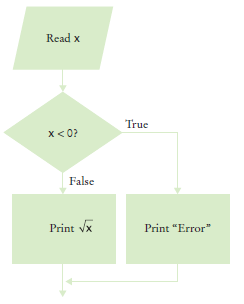
Self Check 5.27
Draw a flowchart for a program that reads a
value x. If it is less than zero, print “Error”.
Otherwise, print its square root.
Answer:
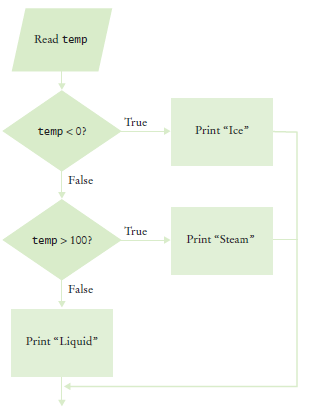
Self Check 5.28
Draw a flowchart for a program that reads
a value temp. If it is less than zero, print
“Ice”. If it is greater than 100, print “Steam”.
Otherwise, print “Liquid”.
Answer:
How would you translate this into code?
Problem Solving: Selecting Test Cases
Black-box testing: a testing
method that does not
take the structure of
the implementation
into account.
White-box testing uses information
about the structure
of a program.
Perform unit tests of each method
Code coverage
is a measure of
how many parts
of a program have
been tested.
look at every if/else branch to see that each of them is reached by some test case
Boundary test cases are test cases that are
at the boundary of
acceptable inputs.
It is a good idea to
design test cases
before implementing
a program.
Problem Solving: Selecting Test Cases
A plan for the TaxReturn class
There are two possibilities for the marital status and two tax brackets for each
status, yielding four test cases
Test a handful of boundary conditions, such as an income that is at the boundary
between two brackets,
and a zero income.
Test an invalid input, such as a negative income
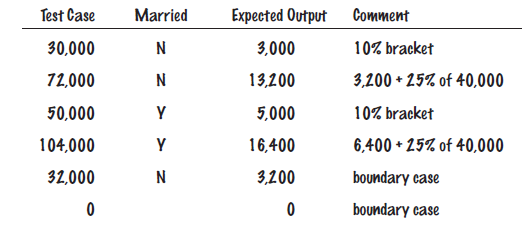
Test cases and expected outcomes
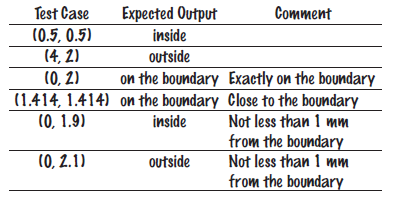
Self Check 5.32
Suppose you are designing a part of a program for a
medical robot that has a sensor returning an x- and
y-location (measured in cm). You need to check
whether the sensor location is inside the circle,
outside the circle, or on the boundary (specifically,
having a distance of less than 1 mm from the boundary).
Assume the circle has center (0, 0) and a radius of
2 cm. Give a set of test cases.
Answer:
Boolean Variables and Operators
To store the evaluation of a logical condition that can be true or false, you use a Boolean variable.
The boolean data type has exactly two values, denoted false and true.
boolean failed = true;
Later in your program, use the value to make a decision
if (failed) // Only executed if failed has been set to true
{
   . . .
}
A Boolean variable
is also called a flag
because it can be
either up (true) or
down (false).
Boolean Variables and Operators
You often need to combine Boolean values
when making complex decisions
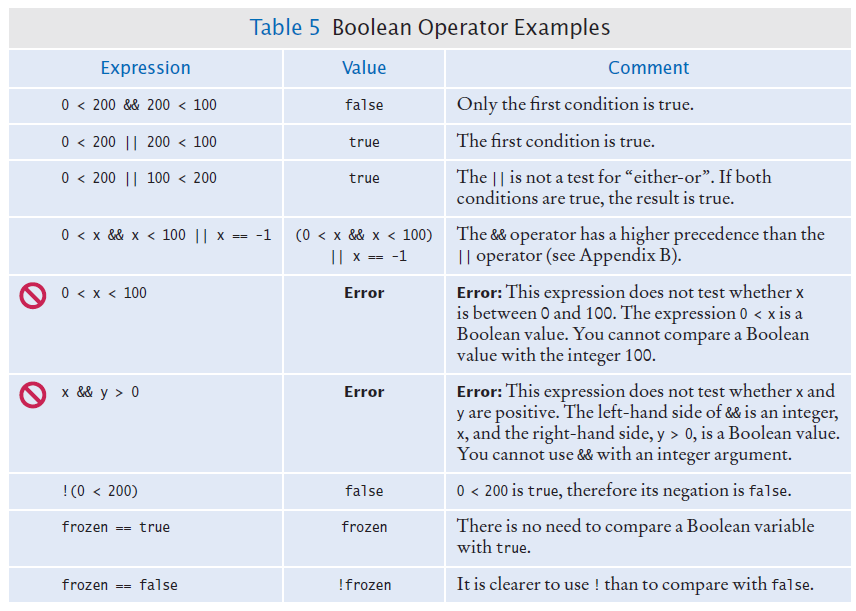
An operator that combines Boolean conditions is called a Boolean operator.
The
&& operator is called and
Yields true only when both conditions are true.
The || operator
is called or
Yields the result true if at least one of the conditions is true.
To invert a condition use the not Boolean operator
The ! operator takes a single condition
Evaluates to true if that condition is false and
Evaluates to
false if the condition is true
To test if the Boolean variable frozen is false:
if (!frozen) { System.out.println("Not frozen"); }
Question 1 Mar 11
Suppose x and y are two integers. How do you test whether both of them are zero?
x = 0 && y = 0
x == 0 && y == 0
x = 0 || y = 0
x == 0 || y == 0
Self Check 5.36
What is the value of !!frozen?
Answer:
The same as the value of frozen.
Application: Input Validation
You need to make sure that the user-supplied
values are valid before you use them
Elevator example: elevator panel has buttons labeled 1 through 20 (but not 13)
The number 13 is invalid
if (floor == 13)
{
   System.out.println("Error: There is no thirteenth floor.");
}
Numbers out of the range 1 through 20 are invalid
if (floor <= 0 || floor > 20)
{
System.out.println("Error: The floor must be between 1 and 20.");
}
To avoid input that is not an integer
if (in.hasNextInt())
{
   int floor = in.nextInt();
   Process the input value.
}
else
{
   System.out.println("Error: Not an integer.");
}
Section_8/ElevatorSimulation2.java
Program Run:
Floor: 13
Error: There is no thirteenth floor.
Self Check 5.38
In the ElevatorSimulation2 program, what is the output when the input is
a. 100?
b. –1?
c. 20?
d. thirteen?
Answer:
(a) Error: The floor must be between 1 and 20.
(b) Error: The floor must be between 1 and 20.
(c) 19 (d) Error: Not an integer.
Self Check 5.39
Your task is to rewrite lines 19–26 of the ElevatorSimulation2 program so that
there is a single if statement with a complex condition. What is the condition?
if (. . .)
{
   System.out.println("Error: Invalid floor number");
}
Answer:floor == 13 || floor <= 0 || floor > 20
Self Check 5.41
Run the following test program and supply inputs 2 and three at the prompts.
What happens? Why?
import java.util.Scanner
public class Test
{
   public static void main(String[] args)
   {
      Scanner in = new Scanner(System.in);
      System.out.print("Enter an integer: ");
      int m = in.nextInt();
      System.out.print("Enter another integer: ");
      int n = in.nextInt();
      System.out.println(m + " " + n);
   }
}
Answer: The second input fails, and the program terminates
without printing anything.