Each part a home builder uses,
such as a furnace or a water heater,
fulfills a particular function. Similarly,
you build programs from objects, each
of which has a particular behavior.
In Java, you build programs from objects
Each object has certain behaviors
You can manipulate the object to get certain effects
Using Objects
Object: an entity in your program that you can manipulate by calling one or more of its methods
Method: consists of a sequence of instructions that can access the data of an object.
You do not know what the instructions are
You do know that the behavior is well defined
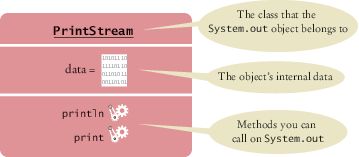
System.out has a println method
You do not know how it works
What is important is that it does the work you request of it
Using Objects
You can think of a water heater as an object that can carry out the "get
hot water" method. When you call that method to enjoy a hot shower, you don't care whether the water heater uses gas or solar power.
Classes
A class describes a set of objects with
the same behavior.
Some string objects
"Hello World"
"Goodbye"
"Mississippi"
You can invoke the same methods on all strings
System.out is a member of the PrintSteam class that writes to the console window
You can construct other objects of PrintStream class that write to different destinations
All PrintStream objects have methods println and print
Classes
Objects of the PrintStream class have a completely different behavior
than the objects of the String class.
Different classes have different responsibilities
A string knows about the letters that it contains
A string doesn't know how to send itself to a console window or file.
All objects of the window class share the same behavior.
Self Check 2.1
In Java, objects are grouped into classes according to their behavior. Would a
window object and a water heater object belong to the same class or to different
classes? Why?
Answer:
Objects with the same behavior belong to
the same class. A window lets in light while
protecting a room from the outside wind and
heat or cold. A water heater has completely
different behavior. It heats water. They belong
to different classes.
Self Check 2.2
Some light bulbs use a glowing filament, others use a fluorescent gas. If you
consider a light bulb a Java object with an "illuminate" method, would you need
to know which kind of bulb it is?
Answer:
When one calls a method, one is not concerned
with how it does its job. As long as a light bulb
illuminates a room, it doesn't matter to the
occupant how the photons are produced.
Variables
Use a variable to store a value that you want to use later
To declare a variable named width
int width = 20;
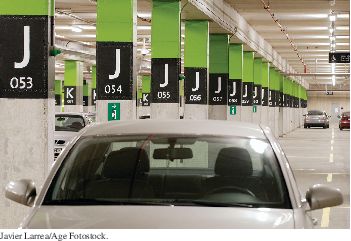
Like a variable in a computer
program, a parking space has
an identifier and a contents.
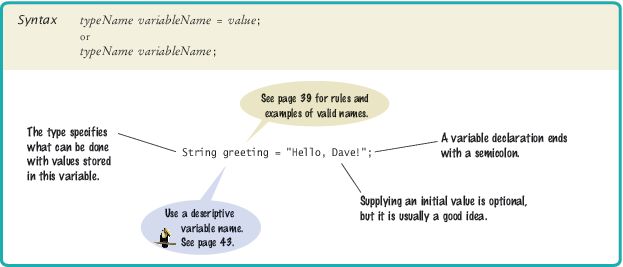
Syntax 2.1 Variable Declaration
Variables
A variable is a storage location
Has a name and holds a value
When declaring a variable, you usually specify an initial value.
When declaring a variable, you also specify the type of its values.
Variable declaration: int width = 20;
width is the name
int is the type
20 is the initial value
Each parking space is suitable for a particular type of vehicle,
just as each variable holds a value of a particular type.
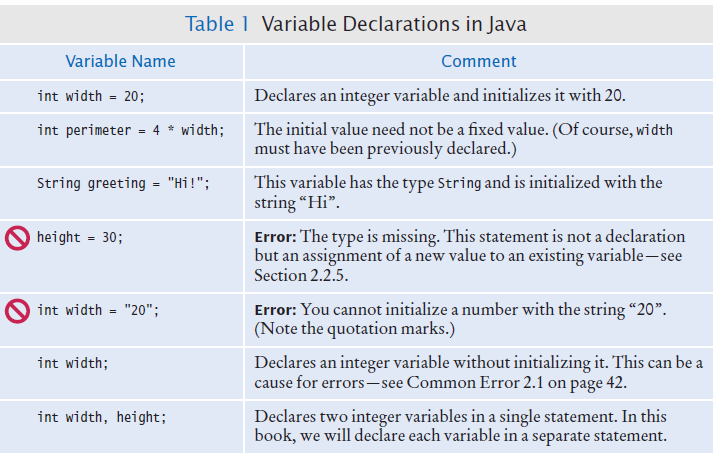
Variable Declarations
Types
Use the int type
for numbers that
cannot have a
fractional part.
int width = 20;
Use the double type for floating point numbers.
double milesPerGallon = 22.5;
Numbers can be combined by arithmetic operators such as +, -, and *
Another type is String
String greeting = "Hello";
A type specifies the operations that can be carried out with its values.
You can multiply the value width holds by a number
You can not multiply greetings by a number.
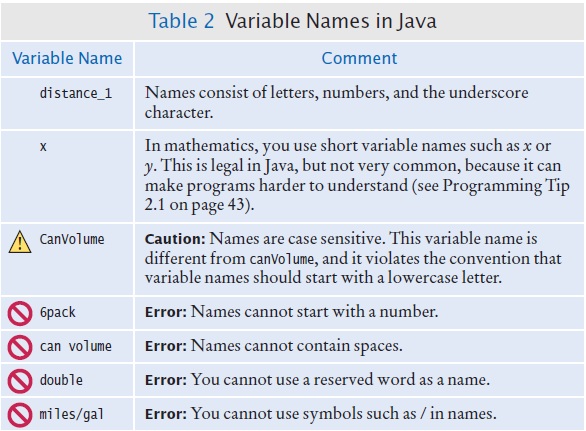
Names
Pick a name for a variable that describes its purpose
Rules for the names of variables, methods, and classes:
Must start with a letter or the underscore (_) character, and the remaining characters must be letters, numbers, or underscores.
Cannot use other symbols such as ? or %
or a space
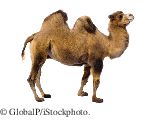
Use uppercase letters to denote word boundaries, as in milesPerGallon.
use
uppercase letters to denote word boundaries,
as in
milesPerGallon. (called
camel case)
Names are case sensitive
You cannot use reserved words such as double or class
By Java convention
variable names start with a lowercase letter
class names start with an uppercase letter
Variable Names in Java
Comments
Use comments to add explanations for humans who read your code.
double milesPerGallon = 33.8; // The average fuel efficiency of new U.S. cars in 2011
The compiler does not process comments
It ignores everything from a // delimiter to the end of the line.
For longer comment, enclose it between /* and */ delimiters.
The compiler ignores these delimiters and everything in between.
Example of longer comments
/*
  In most countries, fuel efficiency is measured in liters per hundred
  kilometer. Perhaps that is more useful—it tells you how much gas you need
  to purchase to drive a given distance. Here is the conversion formula.
*/
double fuelEfficiency = 235.214583 / milesPerGallonS
Assignment
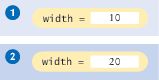
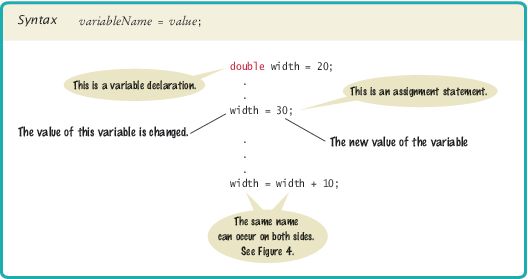
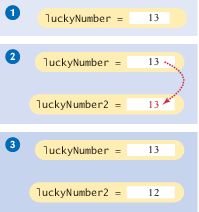
Use the assignment operator (=) to change the value of a variable.
You have the following variable declaration
int width = 10;
To change the value of the variable, assign the new value
width = 20;
Figure 2
Assigning a New Value to a Variable
Assignment
It is an error to use a variable that has never had a value assigned to it
int height;
int width = height; // ERROR - uninitialized variable height
The compiler will complain about an "uninitialized variable"
Figure 3 An Uninitialized Variable
Remedy: assign a value to the variable before you use it:
int height = 20;
int width = height; // OK
All variables must be
initialized before you
access them.
Assignment
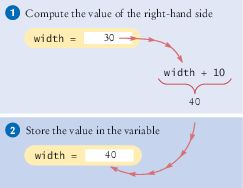
The right-hand side of the = symbol can be a mathematical expression
width = height + 10;
This means
compute the value of height + 10
and store that value in the variable width
width = width + 10
The assignment operator = does not denote mathematical equality.
Syntax 2.2 Assignment
Question 1 Feb 4
What is wrong with the following variable declaration?
int miles per gallon = 39.4
You cannot have spaces in variable names.
The variable type should be double because it
holds a fractional value.
There is a semicolon missing at the end of the
statement.
There is no error
Question 2 Feb 4
What are the types of the values 0 and "0"?
int and int
String and String
int and String
String and int
Self Check 2.7
Which number type would you use for storing the area of a circle?
Answer: double
Self Check 2.8
Which of the following are legal identifiers?
Greeting1
g
void
101dalmatians
Hello, World
<greeting>
Answer: Only the first two are legal identifiers
Self Check 2.10
Is 12 = 12 a valid expression in the Java language?
Answer:
No, the left-hand side of the = operator must be a variable.
Calling Methods
You use an object by calling its methods
All objects of a given class share a common set of methods.
The PrintStream class provides methods for its objects such as:
println
print
The String class provides methods that you can apply to all String objects.
Example: length
String greeting = “Hello, World!”;
int numberOfCharacters = greeting.length();
Example: toUpperCase
String river = “Mississippi”;
String bigRiver = river.toUpperCase();
The Public Interface of a Class
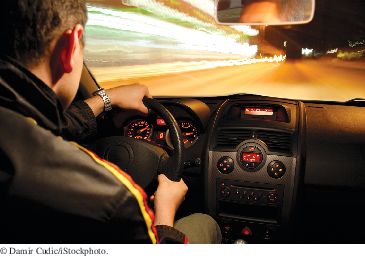
The controls of a car form its public interface.
The private implementation is under the hood.
The String class declares many other
methods besides the length and toUpperCase methods
Collectively, the methods form the public interface of the class
The public interface
of a class specifies
what you can do
with its objects.
The hidden implementation
describes
how these actions
are carried out.
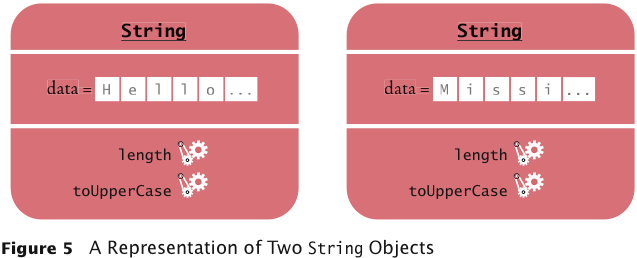
A Representation of Two String Objects
Each String object stores its own data
Both objects support the same set of methods
Those methods form the public interface
Public interface is specified by the String class.
Method Arguments
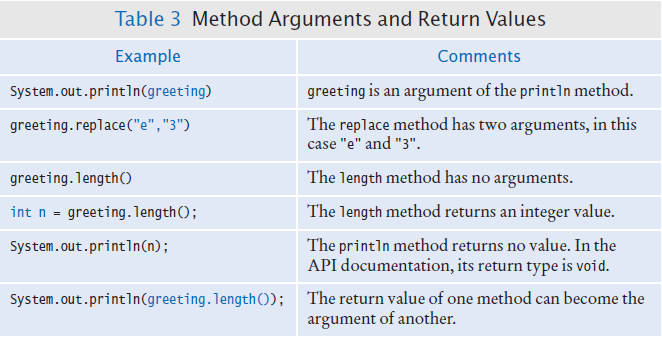
Most methods require values that give details about the work that the method needs
to do.
You must supply the string that should be printed when you call the println method
The technical term for method inputs: arguments
The string greeting is an argument of this method call
System.out.println(greeting);
Passing an Argument to the println Method
Method Arguments
At this tailor shop, the customer's measurements
and the fabric are the arguments of the sew method.
The return value is the finished garment
Method Arguments
Some methods require multiple arguments.
Others methods don't require any arguments at all.
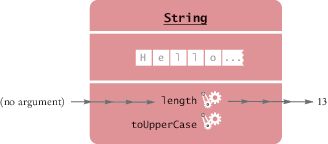
Example: the length method of the String class
All the information that the length method requires to do its job
is stored in the object
Invoking the length
Method on a String Object
Return value
Some methods carry out an action for you.
Example: println method
Other methods compute and return a value.
Example: the Stringlength method
returns a value: the number of characters in the string.
You can store the return value in a variable:
int numberOfCharacters = greeting.length()
The return value of
a method is a result
that the method has
computed.
Return Value
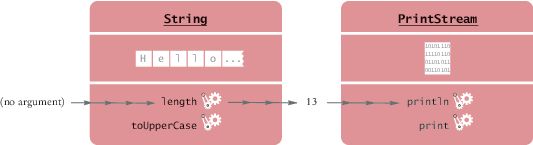
You can also use the return value of one method as an argument of another method
System.out.println(greeting.length());
The method call greeting.length() returns a value - the integer 13.
The return value becomes an argument of the println method.
Passing the Result of a Method Call to Another Method
Return Value - replace method
Example: assume String river = "Mississippi";
Then the statement
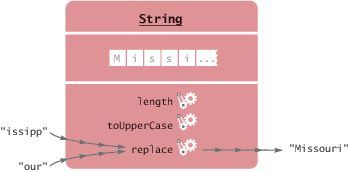
river = river.replace("issipp", "our");
Constructs a new String by
Replacing all occurrences of "issipp" in"Mississippi" with "our"
Returns the constructed String object "Missouri"
And saves the return value in the same variable
You could pass the return value to another method:
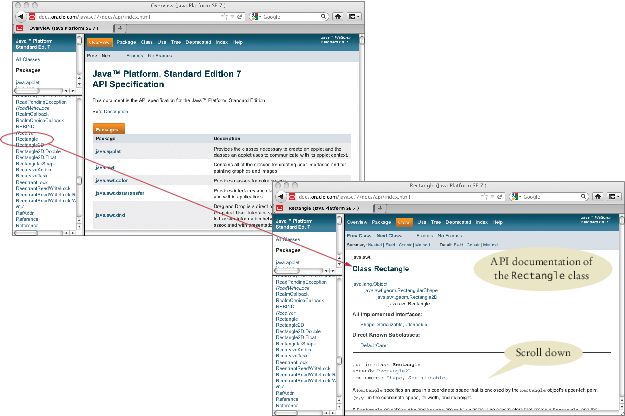
Figure 13 The API Documentation of the Standard Java Library
Locate Rectangle link in the left pane
Click on the link
The right pane shows all the features of the Rectangle class
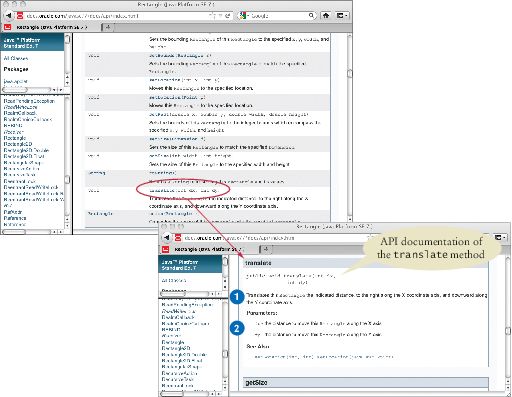
Browsing the API Documentation - Method Summary
Figure 14 The Method Summary for the Rectangle Class
The API documentation for each class has
A section that describes the purpose of the class
Summary tables for the constructors and methods
Clicking on a method's link leads to a detailed description of the method
Browsing the API Documentation
The detailed description of a method shows:
The action that the method carries out
The types and names of the parameter variables that receive the arguments when the method is called
The value that it returns (or the reserved word void if the method doesn't return any value)
Packages
Java classes are
grouped into
packages
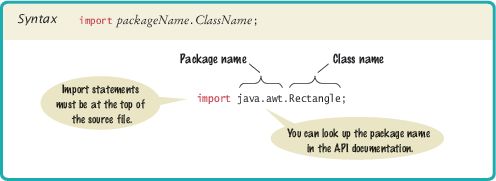
The Rectangle class belongs to the package java.awt.
To use the Rectangle class you must import the package
import java.awt.Rectangle;
Put the line at the top of your program
You don't need to import classes in the java.lang package such as String
and System
Do not put your code into packages in this class
Syntax 2.4 Importing a Class from a Package
Self Check 2.32
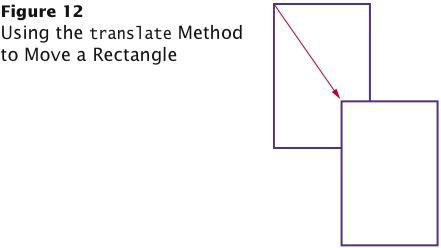
Look into the API documentation of the Rectangle class. What is the difference between the methods void translate(int x, int y) and void setLocation(int x, int y)?
Answer: The arguments of the translate method tell
how far to move the rectangle in the x- and
y-directions. The arguments of the setLocation
method indicate the new x- and y-values for
the top-left corner.
For example, box.translate(1, 1) moves the box
one pixel down and to the right. box.setLocation(
1, 1) moves box to the top-left corner of
the screen.
Self Check 2.33
The Random class is declared in the java.util package. What do
you need to do in order to use that class in your program?
Answer:
Add the statement
import java.util.Random;
at the top of your program.
Question 2 Feb 6
In which package is the BigInteger class located? Look it up in the API documentation.
java.util package
java.lang package
java.math package
java.numbers package
Implementing a Test Program
A test program
verifies that methods
behave as expected.
Steps in writing a tester class
Provide a tester class.
Supply a main method.
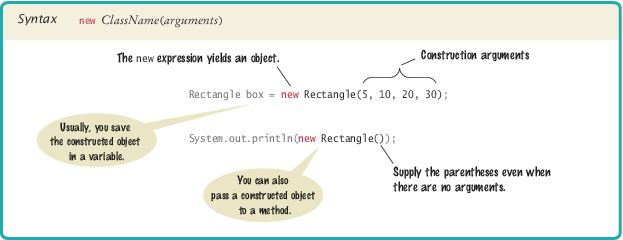
Inside the main method, construct one or more objects.
Apply methods to the objects.
Display the results of the method calls.
Display the values that you expect to get.
Implementing a Test Program
Code to test the behavior of the translate method
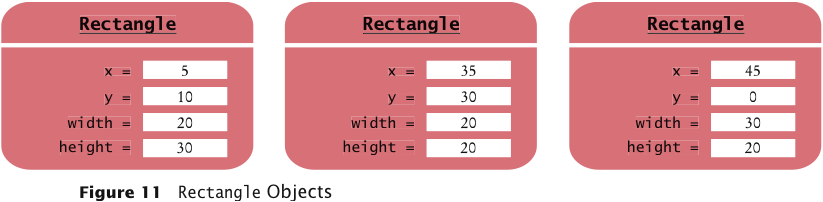
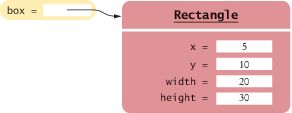
Rectangle box = new Rectangle(5, 10, 20, 30);

// Move the rectangle
box.translate(15, 25);

// Print information about the moved rectangle
System.out.print("x: ");
System.out.println(box.getX());
System.out.println("Expected: 20");
Place the code
inside the main method of the MoveTester class
Determining the
expected result
in advance is an
important part
of testing.
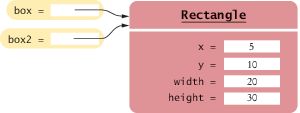
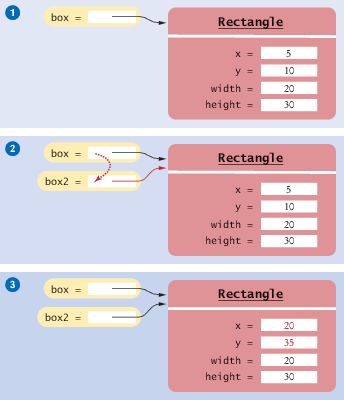
What is the effect of the assignment greeting2 = greeting?
Answer:
Now greeting and greeting2 both refer to the same String
object.
Self Check 2.38
After calling greeting2.toUpperCase(), what are the contents of greeting
and greeting2?
Answer:
Both variables still refer to the same string, and the string has not been
modified. Recall that the toUpperCase method constructs a new string
that contains uppercase characters, leaving the original string unchanged.
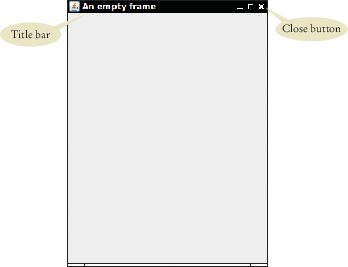
Frame Windows
A graphical application shows
information inside a frame.
Answer:
Construct two JFrame objects, set each of their sizes, and call setVisible(true)
on each of them.
Self Check 2.41
How do you modify the program to draw two squares?
Answer:Rectangle box = new Rectangle(5, 10, 20, 20);
Self Check 2.42
How do you modify the program to draw one rectangle and one square?
Answer:
Replace the call to box.translate(15, 25) with
box = new Rectangle(20, 35, 20, 20);
Self Check 2.43
What happens if you call g.draw(box) instead of g2.draw(box)?
Answer:
The compiler complains that g doesn't have a draw method.
Ellipses
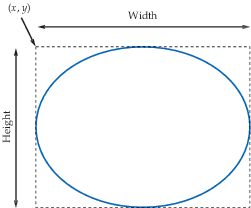
To construct an ellipse, you specify its bounding box
An Ellipse and Its Bounding Box
To construct an Ellipse Ellipse2D.Double ellipse = new Ellipse2D.Double(x, y, width, height);
Ellipses
Ellipse2D.Double is an inner class — doesn't matter to us except for the import
statement:
import java.awt.geom.Ellipse2D; // no .Double
To draw the shape:
g2.draw(ellipse);
Circles
To draw a circle, set the width and height to the same values
Ellipse2D.Double circle = new Ellipse2D.Double(x, y, diameter, diameter);
g2.draw(circle);
(x, y) is the top-left corner of the bounding box, not the center of the
circle.
Lines
To draw a line, specify its end points:
Line2D.Double segment = new Line2D.Double(x1, y1, x2, y2);
g2.draw(segment);
or
Point2D.Double from = new Point2D.Double(x1, y1);
Point2D.Double to = new Point2D.Double(x2, y2);
Line2D.Double segment = new Line2D.Double(from, to);
g2.draw(segment);
Drawing Text
To draw text, use the drawString method
Specify the string and the x- and y-coordinates of the basepoint of the first character
g2.drawString("Message", 50, 100);
Basepoint and Baseline
Colors
To draw in color, you need to supply a Color object
Specify the amount of red, green, blue as values between 0 and 255:
Color magenta = new Color(255, 0, 255);
The Color class declares a variety of colors
Color.BLUE, Color.RED, Color.PINK etc.
To draw a shape in a different color
First set color in graphics context:
g2.setColor(Color.Red);
g2.draw(circle); // Draws the shape in red
Colors - continued
To color the inside of the shape, use the fill method
g2.fill(circle); // fills with current color
When you set a new
color in the graphics
context, it is used for
subsequent drawing
operations.





 Use uppercase letters to denote word boundaries, as in milesPerGallon.