7A
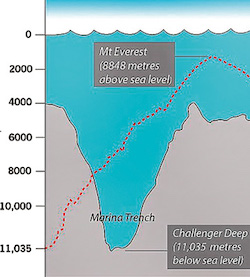
Every place on earth has an elevation either above or below sea level from Mount Everest (29,035 feet above sea level) to the Challenger Deep in the Mariana Trench (36,070 feet below sea level)
Write an application (A program that has a main methods) called SeaLevelProcessor to read a collection of integers, each representing a (positive) distance above or a (negative) distance below sea level (elevation) of a point on the earth. The input will terminate when the user enters a non-integer.
Use this prompt: System.out.print("Enter the sea level or Q to quit: ");
Note: you will actually quit on any string that can not be converted to an int.
Do the following:
Only print the numbers if at least 1 integer was entered. Otherwise print "No values entered"
You will read the inputs one at a time and do all the processing as you go. No Arrays for this
The outputs should be on separate lines and in this order
Do not initialize the maximum to some 0 or a negative number. Initialize to the first input. You can use a Boolean variable as a flag as discussed in the videos.
No Javadoc required when there is only a main method.
For the draft, read the numbers and print them, one to a line. Quit when the input can not be converted to a int. (That means hasNextInt() returns false.) Use the prompt given above. After exiting the loop, print "All done" (only in the draft)
7B
Write a class StringsAndThings. It has a constructor that takes a String parameter.
Write methods:
countNonLetters that will count how many of the characters in the string are not letters. You can use Character's isLetter methodmoreVowels which returns true if the String parameter has more vowels than consonants. Otherwise it returns false. Ignore punctuation and digits. Add the isVowel method from Lab6 to your class. You can use isLetter from the Character classnoDuplicates which returns a string where each character in the phrase appears exactly once. Consider upper and lower case letters as different letters. Note that spaces and punctuation are also characters. This is a good place to use String's contains method. Hint: Remember if dup is true then !dup is false. Do not use a do-nothing if clause. There are a lot of weird solutions on the Internet. Do not use anything we have not covered. If the string is Mississippi, the return value will be Misp. Hint: it is easier to use substring here than charAt.No starter file. Provide Javadoc for the class, the constructor, and all methods.
For the draft: implement the class with constructor and instance variable and the countNonLetters method. Provide Javadoc for the class the constructor and the method.
7C
A digital image is made up of pixels. Each pixel is a tiny square of a given color. The Picture class has methods to manipulate pixels. Each pixel has x, y coordinates. You can think of the image as being rows of pixels. The x coordinate is the row and the y coordinate is the position within the row. The x coordinate varies from 0 to the width of the image, and the y coordinate varies from 0 to the height of the coordinate. You can use nested loops to pick up each pixel in the image and then do something with it. Worked Example 6.2 gives an example of iterating through all the pixels in an image.
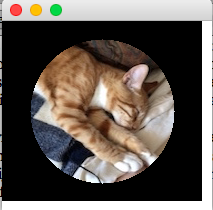
Your task is to write an application Framer that can put a round frame around a Picture. See the output below. You should set all the pixels outside the circle to black. The center of the circle is the center of the image, and the radius is 40 percent of the width or height, whichever is smaller. Find the center by dividing the width and the height of the image by 2. Get the width and height by using methods so that the code will work if you use any image. That is, do not assume that the dimensions of the image are 200 x 180.
You will need to import the Udacity graphics package into your project.
Hint: If the distance of the pixel from the center of the circle is greater than the radius, set the pixel color at that x, y to Color.BLACK. Think Pythagorean Theorem
Here is the original image of oliver_bed.jpg

Here is the a screenshot of the output
For the draft, make the first row of pixels red (We are using red because it is more visible on the image than black. You will use black in the final). The y coordinate of every pixel in the first row is 0. Use Picture's getWidth method to get the width of the image.